Beitrag von: Aura am Oktober 19, 2012, 03:02:42 Nachmittag
Hi y'all,
As you may know, the DUST bunnies (sssh, don't tell them I'm calling them that) will soon be joining us in New Eden. We have started to prepare for that and today in Inferno 1.3 you will notice some changes to your chat windows, even though the bunnies are not here yet.
When the DUST Infantry does join us EVE Capsuleers, we will have two different sets of players in the channels and when possible we wanted to show separate character counters for these two groups; one for the Capsuleers and another one for the Infantry.
There were so many icons in the chat windows already that they would have been overloaded and perhaps slightly cluttered if we had just gone ahead and added the two counters in there. So we decided to use the opportunity to do something we have wanted to do for a while: to clean up the chat windows a little bit.
Before there were three icons to change how the chat messages appeared and other three icons to change the member list behavior. We felt that these were options were taking up too much space, especially considering people don't tend to change them that often. There were also a bunch of settings and actions available through right clicking either the window header/tab or the chat output, and even more settings to add for the DUST integration. We wanted to collect this all into one place, and make more easily accessible and coherent.
Our solution was to replace this all with two utility menus that can be opened from icons in the window.
The first menu holds channel settings and various actions and the second menu holds all member list settings, as you can see in the images below.
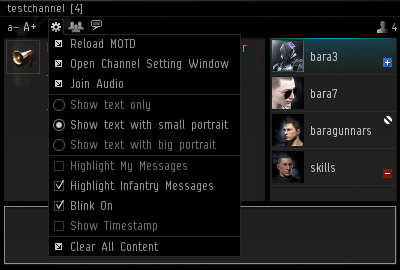
Channel settings and actions
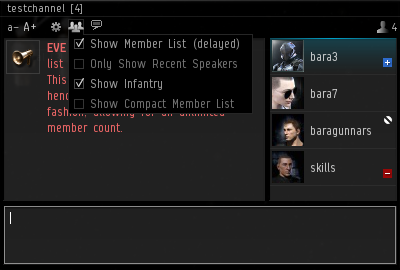
Member list settings #1 (delayed mode channel)
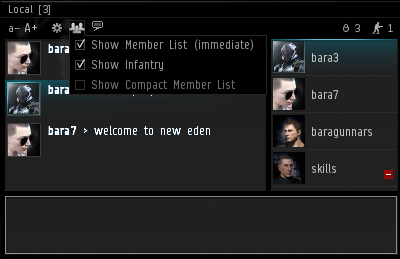
Member list settings #2 (immediate mode channel)
Many of these options and actions should be familiar to you so I will only explain the ones that might not be:
All Infantry in character lists, such as in the chat channel member list and the guest list in stations, will be differentiated from the Capsuleers with a blue-green tint. When they speak, their chat message will have the same blue-green tint.
In case you don't want the messages from the DUST guys to stand out with this tint then you can toggle the tint on and off with "Higlight Infantry Messages".
Since we were fiddling with message colors anyway we decided we might as well add something that you, our EVE peeps, have asked for: enabling you to highlight your own messages, which you do by toggling "Highlight My Messages" on.
Toggling "Show Infantry" in the member list menu allows you to hide the DUST characters from the member list in the channel.
So that was the easy stuff...
A channel can be in either of two modes, immediate mode or delayed mode:
When you enter a channel that is in immediate mode, the client will get the information on all the members in the channel. Every time someone joins or leaves the channel, the member list is updated to reflect that. Local Chat is a channel that is always in immediate mode (except in wormholes).
The member list of the delayed channels on the other hand is not updated when you join, and you cannot expect it to be updated more than every 5 minutes.
The creator of a channel can set the mode, immediate or delayed, but the max member count for immediate channels is 50 characters.
The way the mode was represented before was rather confusing, but we have tried to simplify it:
"Show Memberlist («channel mode»)" will allow you to show or hide the member list, and the tooltip of that option will explain what it means for a channel to be in that mode.
The notion of "Recent speakers" only applies to channels in delayed mode. It's very straight forward: recent speakers is just a list that your own client populates as someone speaks in the channel, and it keeps those characters in the list for the next 15 minutes. If the member list is set to be off then that option is disabled.
I should note that some very big channels, such as the Constellation Chat channels, only allow you to view the recent speakers, not the full member list.
And that finally brings me to the counters... You're still with me here?
Like I said in the beginning, we wanted to show separate counters for EVE and DUST players when possible:
Since we have all the character information when a channel is in immediate mode, we show separate counters for those channels.
For the delayed mode channels, however, we do not have exact member information available and only an estimated member count, and we therefore show a combined member count for those channels.
The channel header/tab will display the number of EVE players for channels in immediate mode (since Local Chat is an important intelligence tool), but displays the combined character count for channels in delayed mode.
And that's all I have to say about that.
- CCP karkur
Source: Look Who's Talking (http://community.eveonline.com/devblog.asp?a=blog&nbid=73468)